Now, this one is epic! 😂 #archlinux #linux #gnulinux #foss #memes

Now, this one is epic! 😂 #archlinux #linux #gnulinux #foss #memes
À force d’années, votre répertoire /home contient sans doute une quantité invraisemblable de fichiers inutiles, sans doute même venant d’applications que vous n’utilisez plus. Même sans aller jusqu’à des solutions d’isolement genre firejail/bubblewrap, on peut cantonner simplement une application à son répertoire fin qu’elle n’aille pas placarder ses fichiers partout dans votre $HOME.
Dernièrement, je suis retombé sur une vieille mauvaise habitude du monde Linux/DevOps/Cloud : installer un outil avec une commande du type : curl -sSL https://example.com/install.sh | bash Ou pire : curl -sSL https://…
⋅ L’État français lâche Windows pour Linux et veut se désensibiliser des outils américains
#Linux
Sur Arch, j’ai configuré Super + X pour afficher un menu de recherche floue (fuzzy search) sur tous les sous-dossiers de ~, on tape quelques lettres, et le dossier choisi s’ouvre dans Nemo, ou dans vscode suivant le gestionnaire de fichiers choisipar défaut.
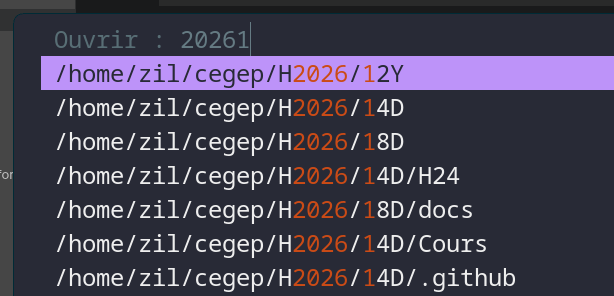
Fuzzel est un lanceur d’applications léger conçu pour Wayland. Il joue le même rôle que Rofi ou Dmenu, mais natif Wayland : pas de dépendance X11, démarrage quasi instantané.
Il a deux modes :
--dmenu) : lit des lignes sur l’entrée standard et retourne la ligne choisie — c’est ce mode qui sert iciC’est ce deuxième mode qui le rend scriptable pour n’importe quel menu personnalisé.
Installation :
# Arch
sudo pacman -S fuzzel

# Debian/Ubuntu
sudo apt install fuzzel
Le script est à mettre dans ~/.config/fuzzel/fuzzel-open-dir :
#!/usr/bin/env bash
# Propose tous les sous-dossiers de ~ (niveau 4)
CHOICE=$(find ~ -maxdepth 4 -type d | sort | fuzzel --dmenu --prompt "Ouvrir : ")
[ -n "$CHOICE" ] && xdg-open "$CHOICE" &
Trois choses se passent :
find ~ -maxdepth 4 -type d liste récursivement tous les dossiers jusqu’à 4 niveaux de profondeur depuis ~fuzzel --dmenu qui affiche le menu interactif avec recherche flouexdg-open ouvre le dossier dans le gestionnaire de fichiers par défaut (ici Nemo)Rendre le script exécutable :
chmod +x ~/.config/fuzzel/fuzzel-open-dirDans ~/.config/hypr/hyprland.conf, $mainMod est défini sur SUPER (touche Windows), et le bind est :
$mainMod = SUPER

bind = $mainMod, X, exec, ~/.config/fuzzel/fuzzel-open-dirSuper + X → fuzzel s’ouvre en mode dmenu avec le prompt Ouvrir :
devblo, pour charcher le dossier ~/dev/blogueEntrée pour ouvrir.Ce qui a marché pour résoudre les problèmes de lenteur de l’émulateur Android Studio sur Arch Linux avec Wayland.
Dans ~/.android/advancedFeatures.ini ajouter la ligne
QuickbootFileBacked = off
Why is this running? Contribute to pranshuparmar/witr development by creating an account on GitHub.
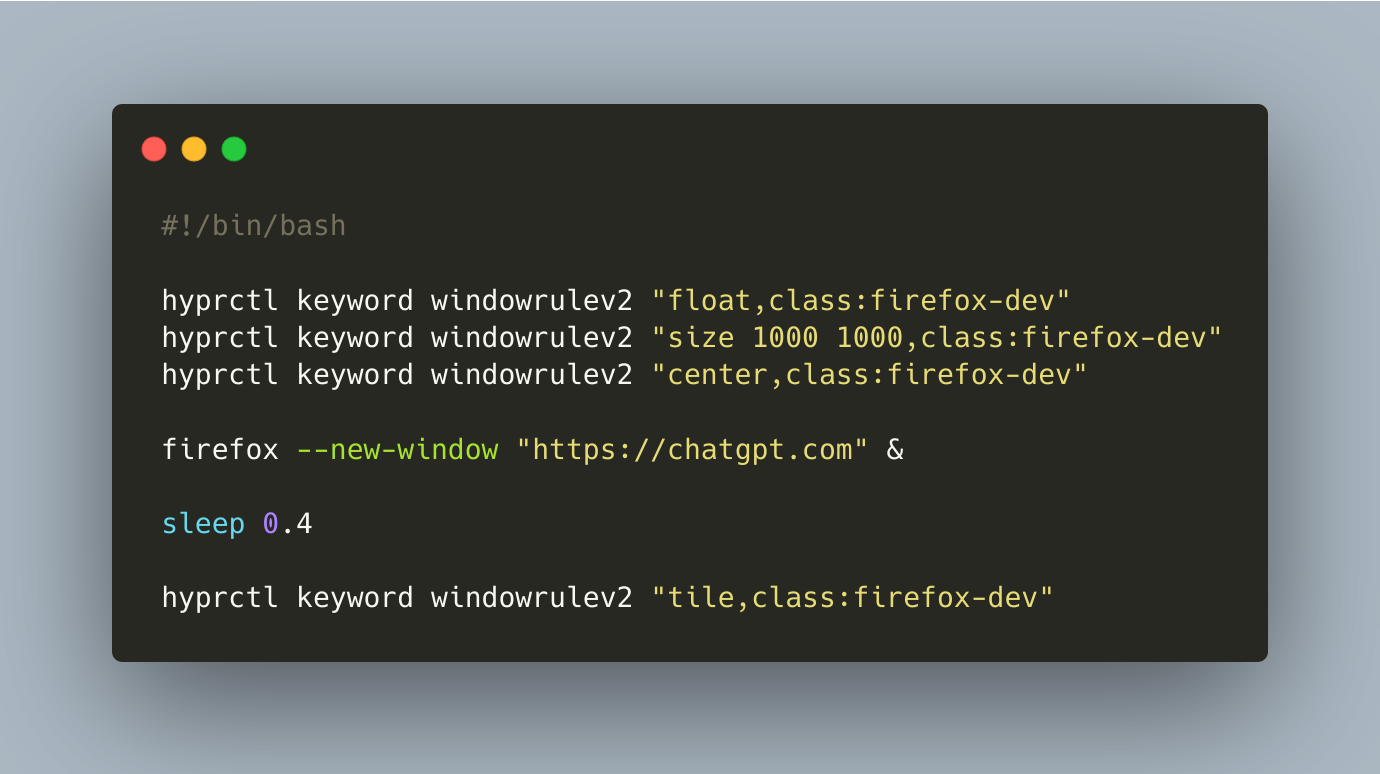
How to tell Hyprland to open a new small Firefox window in the center of the screen with specific URL? Set “temporary” rules.
#linux #bash #hyprland
Comment le noyau de Linux se charge au moment où vous presseez le bouton pour allumer l’ordinateur
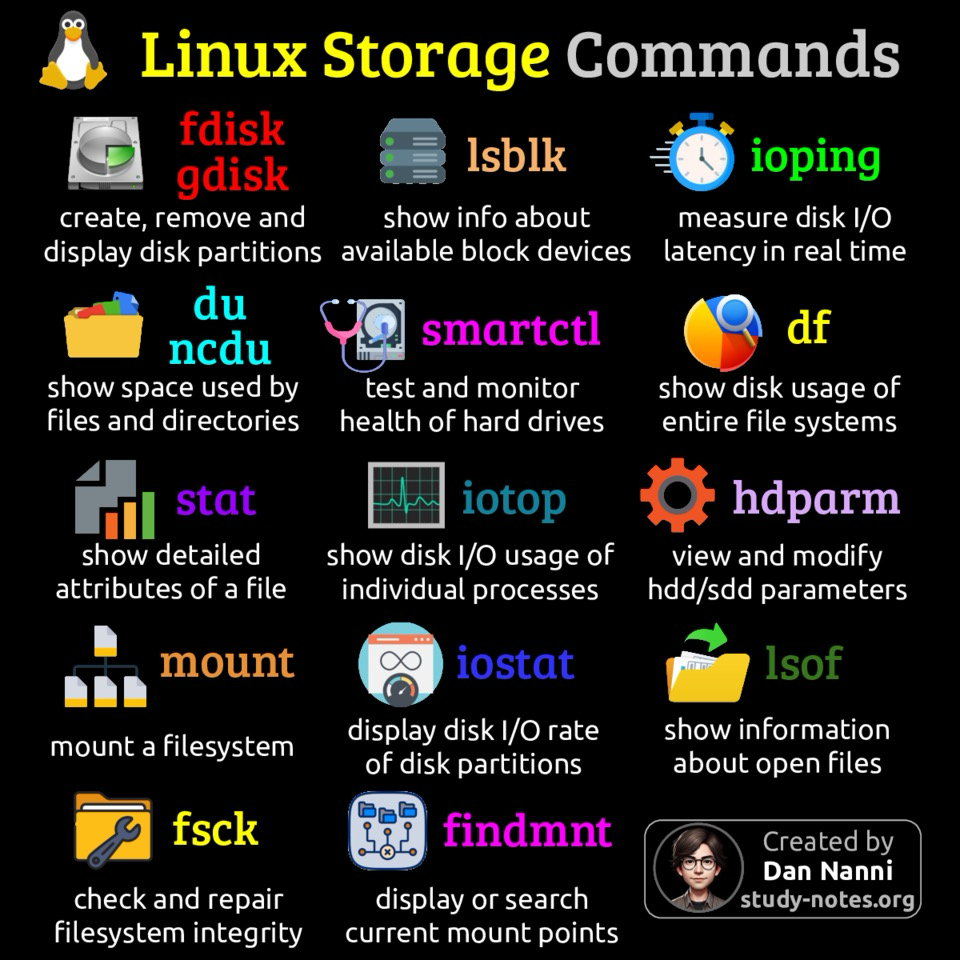
:tux: Diventa padrone del tuo storage su Linux 💪
🐧Ecco i comandi essenziali per gestire dischi, partizioni e file system come un vero sysadmin.
:linux: Spremi al massimo le prestazioni I/O e tieni il tuo sistema sempre scattante ⚡
:fedilug: Trovi tutte le infografiche su Linux seguendo il gruppo FediLUG su 👉 @linux@diggita.com
#Unolinux #Linux #DevOps #SysAdmin #FLOSS #OpenSource #GnuLinux #freesoftware #softwarelibero
#freesoftware
#softwarelibero
#unolinux
#linux
#devops
#sysadmin
#floss
#opensource
#gnulinux
Question:
I need a self-hosted webhook solution, where I can create customized webhooks that triggers bash-scripts,
#askfedi #askfediverse #linux #bash
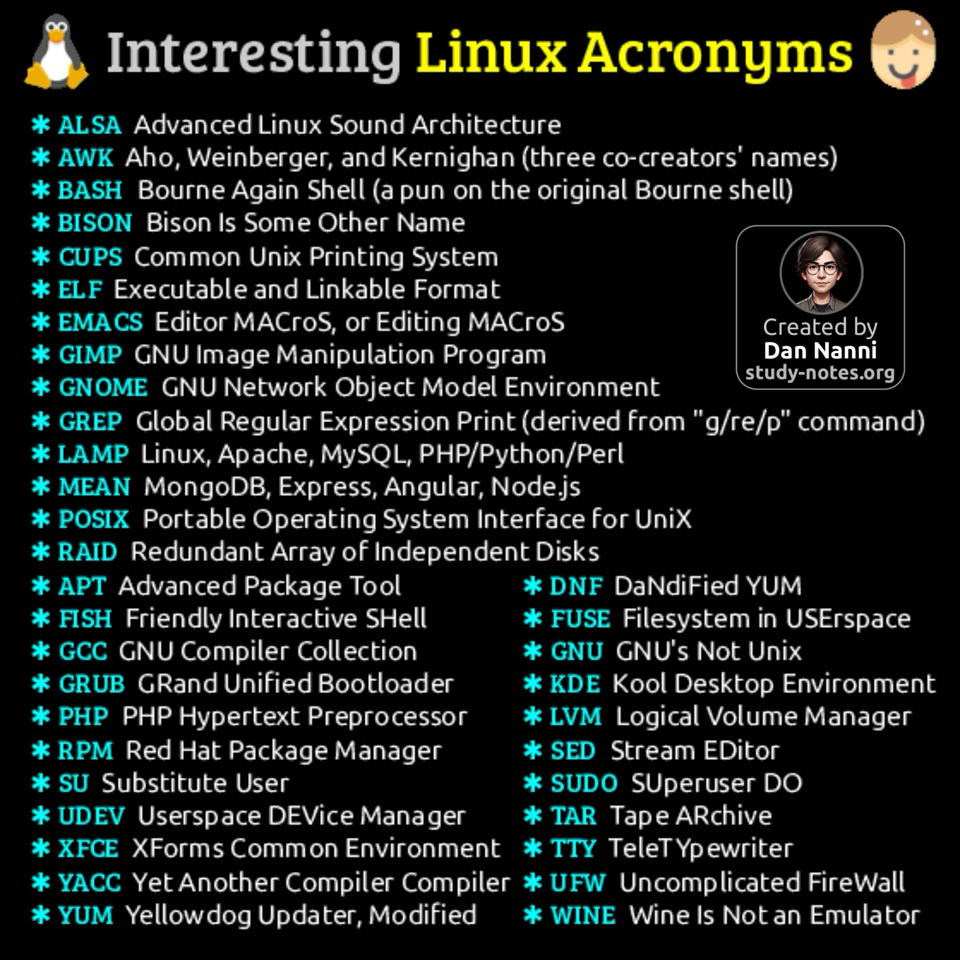
Acronyms invented in the Linux OS ecosystem are often clever, humorous, or recursive, blending technical meaning with playful or pun-filled wordplay to reflect the culture of #opensource development 😎👇
Find high-res pdf books with all my #Linux related infographics at https://study-notes.org
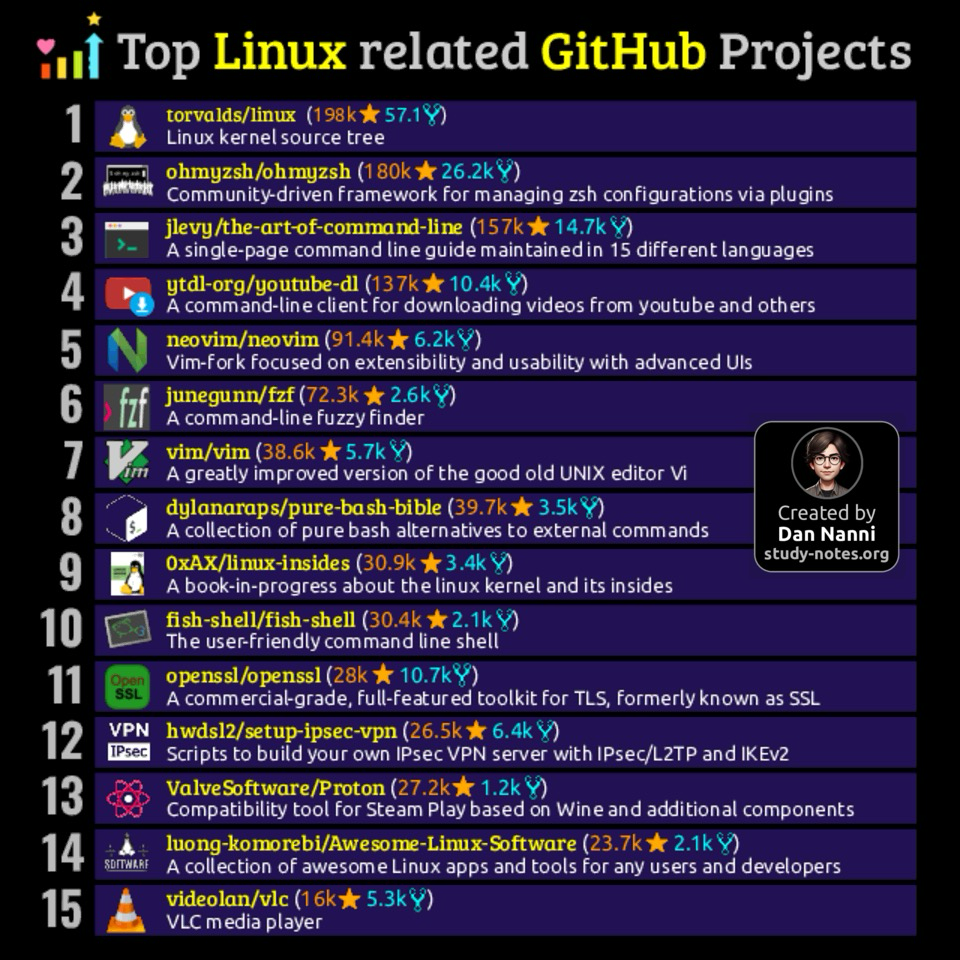
✅ Most popular Linux-related GitHub projects
As an avid Linux fan, I am always curious about the most popular open-source Linux projects hosted on GitHub. Here are some of the top ones! 😎👇
Think something important is missing? Let me know! #opensource #foss
Find high-res pdf books with all my #linux related infographics at https://study-notes.org
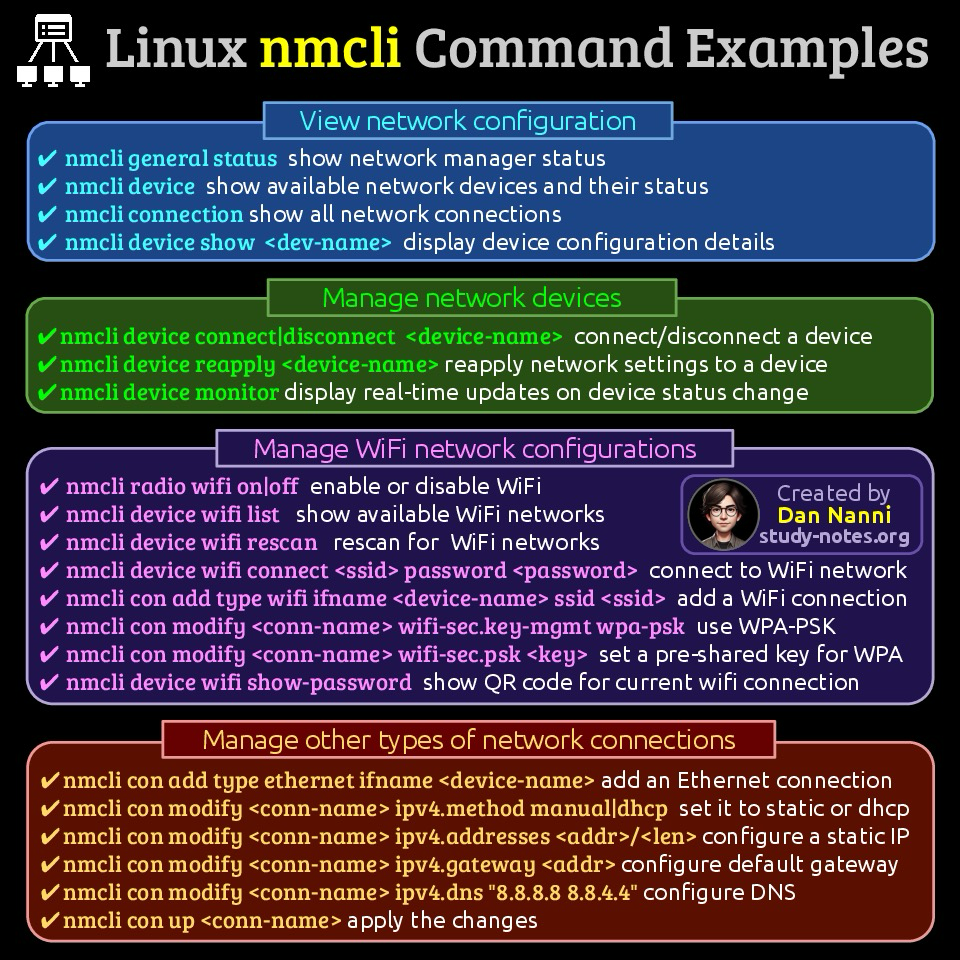
nmcli is a Linux command-line utility that interacts with NetworkManager, enabling users to create, modify, and manage network connections, check connection status, and perform basic network diagnostics directly from the terminal
Here are useful nmcli command examples 😎👇 #sysadmin
Find high-res pdf books with all my #linux related infographics at https://study-notes.org
✅ Nano text editor shortcuts
Whether you are new to Nano or use it often on Linux, this shortcut list will help you navigate and edit text more efficiently on Nano editor 😎👇 #opensource
Find high-res pdf books with all my #Linux related infographics at https://study-notes.org

❓ How to test your internet speed in Linux???
⚡ Install: sudo apt install speedtest-cli ⚡ Run: speedtest-cli
Check your network speed right from the terminal! 🔥 #Linux #Networking #SpeedTest

🚀 Linux Networking Cheat Sheet! 🌐
🔹 Public IP:
curl ifconfig.me | dig +short myip.opendns.com @resolver1.opendns.com
🔹 Private IP:
ip a | hostname -I
🔹 Open Ports:
netstat -tuln | ss -tuln
🔹 Gateway:
ip route | grep default
🔹 Trace Path:
traceroute example.com | tracert example.com
🔹 DNS Lookup:
nslookup example.com | dig example.com
💻 Stay secure & level up! 🔥 #Linux #Networking #CyberSecurity

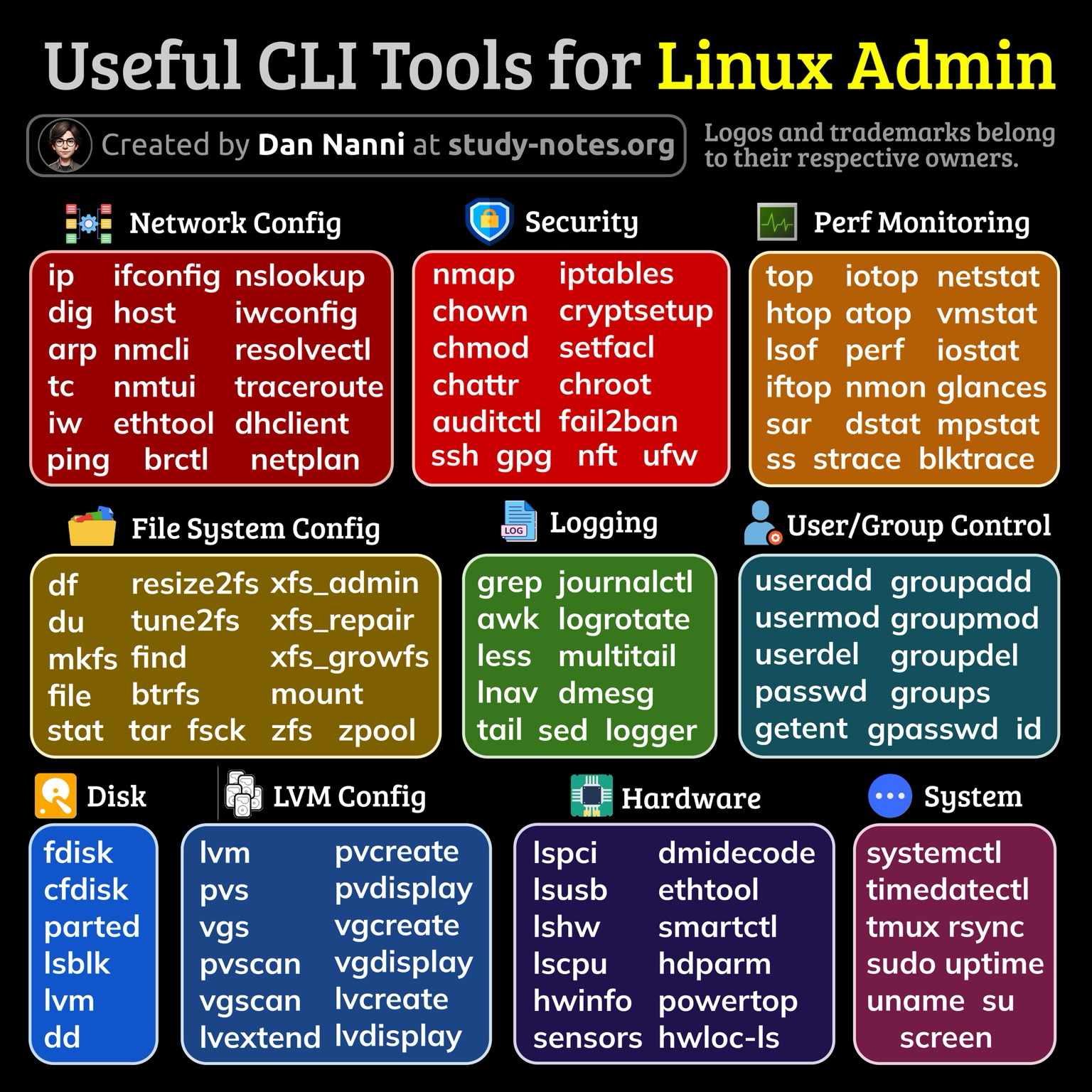
Key command-line tools for managing Linux systems include those for filesystem configuration, performance monitoring, network setup, hardware management, security, log monitoring, and user/group management
Here is a categorized list of essential Linux commands for system administrators 😎👇
#linux #sysadmin
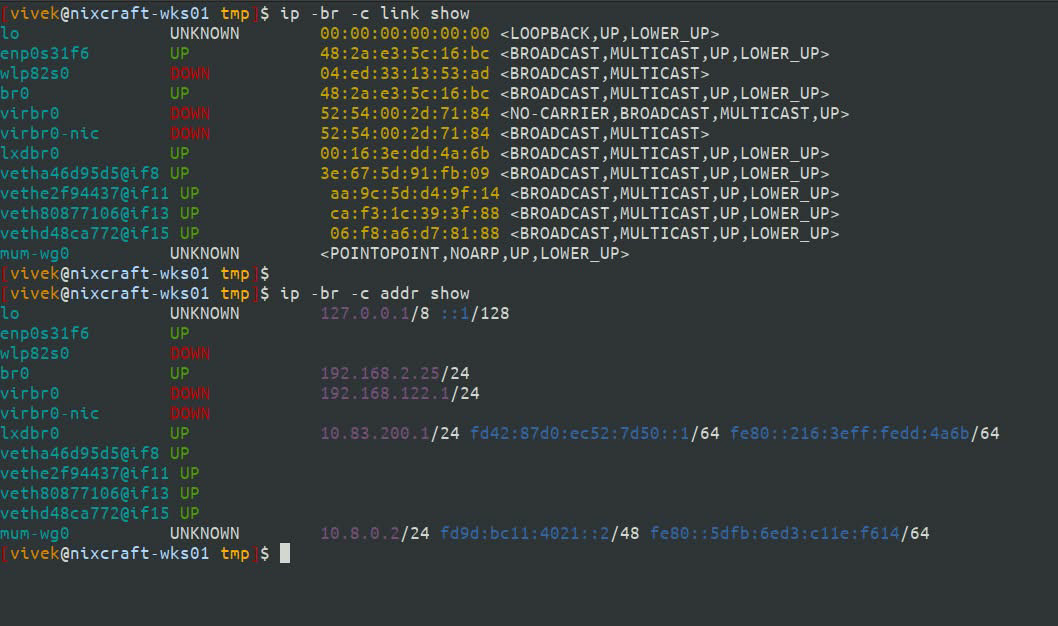
//Did you know you can colorize and print all IP addresses and interfaces on Linux in a tabular format for better readability? The syntax is:
ip -br -c addr show ip -br -c link show
See our ip command guide https://www.cyberciti.biz/faq/linux-ip-command-examples-usage-syntax/ pretty cool, huh?
#Linux #SysAdmin
How to Run #Linux Commands without Typing #Sudo Password 🐧
https://ubuntushell.com/execute-command-without-sudo-password/
#tech #coding #hack #security #cybersecurity #programmer #linux #kalilinux #ubuntu #linuxmint
#tech
#coding
#hack
#security
#cybersecurity
#programmer
#linux
#kalilinux
#ubuntu
#linuxmint
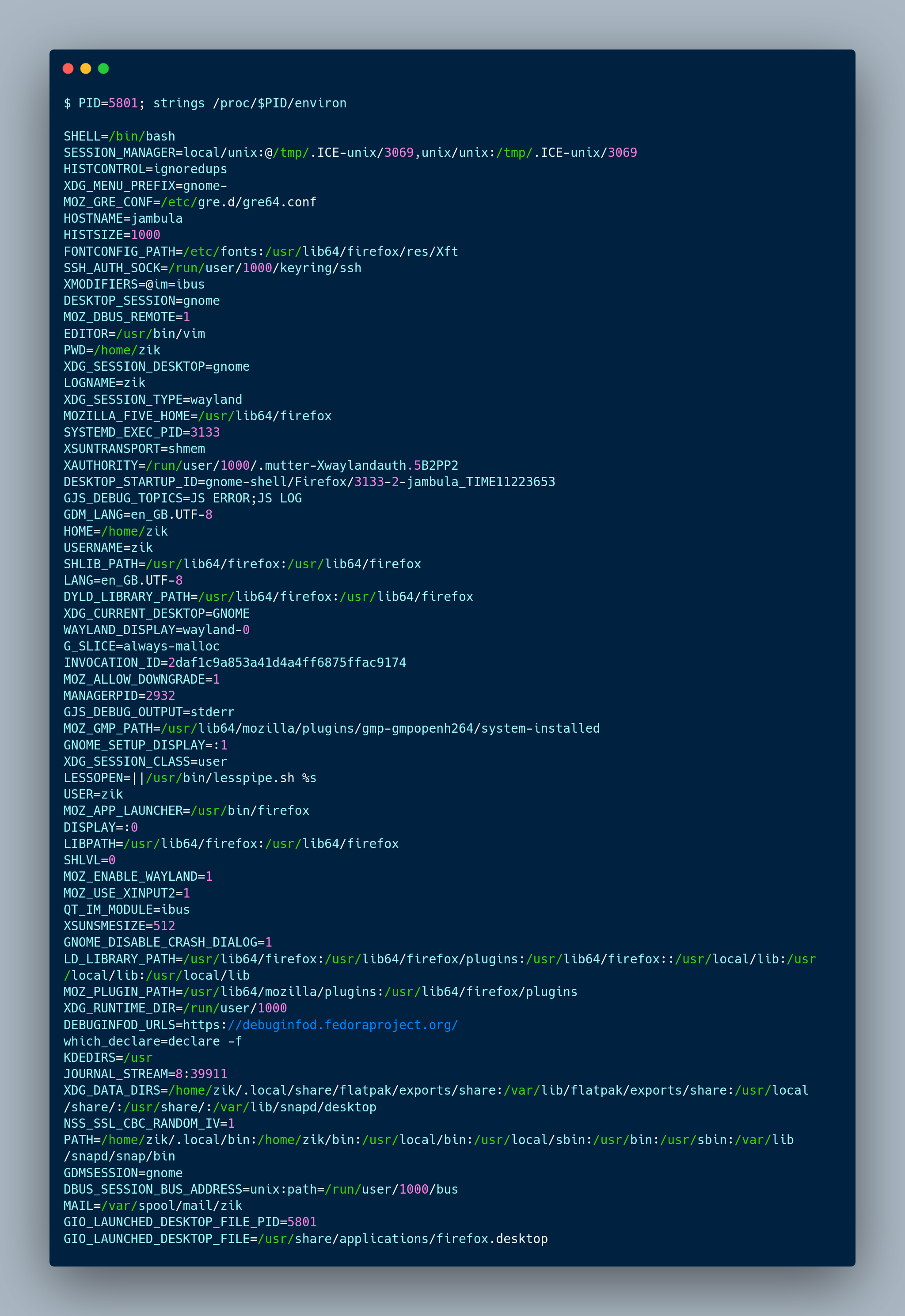
Display the environment variables used by a given process in Linux
PID=5801; strings /proc/$PID/environ
#ZikTIPs #CLI #Linux #Opensource
Inspect web traffic:
Terminal 1: Start your server
./my-web-server -port 8080
Terminal 2: Start netcat/tee “proxy”
nc -lk 3000 | tee /dev/tty | nc localhost 8080
Terminal 3: Send requests to “proxy”
curl http://localhost:3000
See raw HTTP requests/responses in Terminal 2 between client and server.
That’s it. That’s the toot.
#Linux #HTTP #TCP #Networking
In this article, we will show you how to analyze a Linux system boot-up performance statistics using systemd-analyze, one of numerous utilities under systemd.